Panels FX
Cuts the video into panels: rect, rounded, ellipse, diamond or window arch, with heights that morph over time.
R$ 16,90 until 11/30
Kinetic typography for worship lyrics, right inside Resolume. Kinetic FX receives the text from Holyrics, SPresenter or ProPresenter 7 and animates every verse on its own, even with knockout letters that show the background video.

 1. Worship Glow with the emphasis word on its own line
"Teu é o" on top and "PODER" big and golden below, with glow
 2. Gold 3D with 3D tilt
golden letters with 3D depth, tilted by the 3D camera
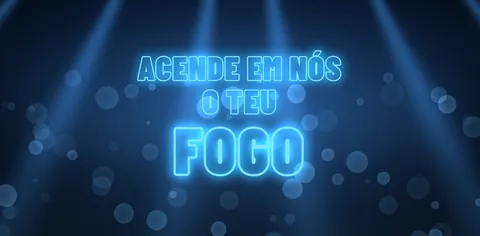 3. Hollow Neon (hollow letters with neon glow)
only the letter outlines lit in blue neon, with a bigger emphasis word
 4. Fire 3D with Text FX Mirror Floor
3D letters in fire colors with a reflection on the floor
 5. Chrome 3D with a huge emphasis word
"Luz do" on top and a huge "MUNDO" below, in 3D chrome
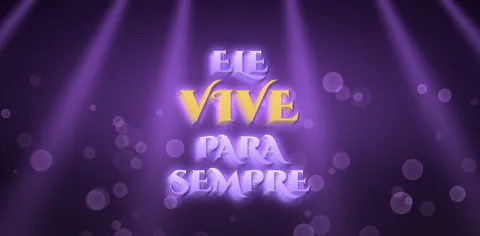 6. Royal in Word Stack with Text FX Clone Echo
one word per line, in royal purple, with echo copies behind the letters
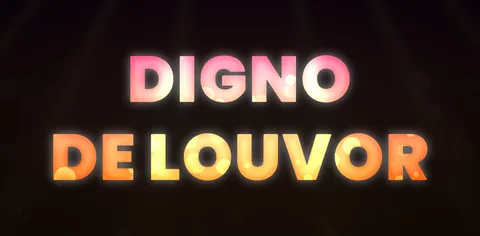 7. Video Fill: the letters show the background video (Cinema Window)
the video shows inside the letters and the background is dimmed
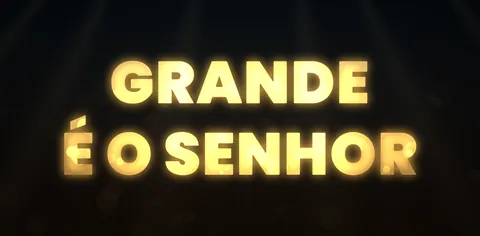 8. Video Fill with gold tint and edge glow (Gold Window)
the video inside the letters gets a gold tint and an edge glow
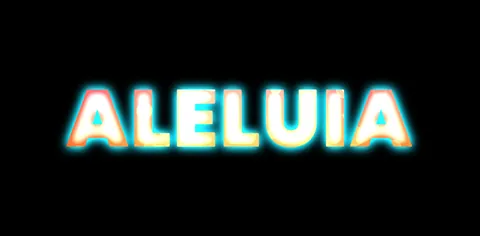 9. Video Fill with black outside and neon edge (Neon Edge)
the video only inside the letters, with a black outside and a neon edge
Reads the lyric text from Holyrics, SPresenter or ProPresenter 7 (not the image) and animates verse by verse on its own. During the service, the operator just advances the lyrics.
Knockout letters show the video behind them (background, motion loop or camera), with 7 ready-made presets and a reveal where the letters fill up with video.
20 idle animations, 12 emphasis effects and 25 motion presets. Verse changes can overlap, wait for the exit, hard cut or do a quick fade.
Worship Glow, Fire, Gold 3D, Holy Light, Hollow Neon and more, with glow, outline, shadow, 3D depth, a 3D camera, Text FX and BPM Sync.
Highlight words with their own effect, or put them on their own line, really big. When a verse hasn't been edited, Auto Emphasis picks one for you.
With the This Verse group, right in Resolume, or in the optional Advanced Editor in your browser (currently in Portuguese). A chorus edited once applies to every repeat.
Kinetic FX is like having After Effects inside Resolume for worship lyrics. It receives the lyric TEXT from Holyrics, SPresenter or ProPresenter 7 (not the image) and animates each verse with entrances, exits, motion while the verse is on screen, emphasis words, 3D depth, glow, outline and shadow. During the service nothing changes for the operator: just advance the lyrics in Holyrics as usual and Resolume animates on its own. Video Fill: the letters can show the video behind them (background, motion loop or camera), with the outside dimmed, normal, black, transparent, solid color, grayscale, blurred or tinted. Adjust zoom, saturation, contrast and tint of the video inside the letters, with edge glow and letter shadow. Or let the lyrics change color on their own to match the background (Auto Color, Auto Contrast and Auto Local). There are 7 ready-made presets (Cinema Window, Paper Cut, B&W Pop, Gold Window, Neon Edge, Frosted and Color Pop) and a reveal where the letters start empty and fill up with video. The knockout can apply to a single verse, like the chorus. Plenty of ready-made options: 43 entrances, 30 exits, 20 idle animations, 12 emphasis effects, 25 motion presets, 35 looks (Worship Glow, Fire, Gold 3D, Holy Light, Hollow Neon...) and 33 built-in fonts, plus a 3D camera, Text FX and BPM Sync. Verse changes can overlap, wait for the exit, hard cut or do a quick fade. The connection lives inside the plugin: in Source, choose Holyrics (free, no token), Holyrics API, SPresenter, ProPresenter or Manual. The Connection bar shows whether it is connected and which song is live. Edit only the key verses right in Resolume with the This Verse group, or in the optional Advanced Editor (in your browser), where you can add whole songs, import the service playlist/setlist and build your own looks and animations in the Studio. A chorus edited once applies to every repeat. Note: the Advanced Editor is currently in Portuguese. Requirements: Windows 10/11 64-bit, Resolume Arena or Avenue 7, and Holyrics (any version with HTML output; 2.21 or newer for API mode) or SPresenter with the Integration API or ProPresenter 7.9 or newer (with Network enabled). Holyrics API mode requires the Holyrics Plan Basic subscription.
Free update for existing customers: just request your link again in My purchases.
The same controls you get in Resolume.
| Parameter | Range / options | Default |
|---|---|---|
| SOURCE · Source | Holyrics (free, no token) · Holyrics API (Holyrics Plan Basic subscription) · SPresenter · ProPresenter · Manual; only the fields for the chosen software show up | — |
| SOURCE · Holyrics IP · Holyrics Port · Holyrics Token | IP of the Holyrics computer (127.0.0.1 on the same computer) · auto = port 80 of the HTML output (8091 in API mode) · API Server token (API mode only) | auto |
| SOURCE · SPresenter IP · Port · Token · Layer | the ones from the base URL shown in SPresenter (e.g. 192.168.101.8 and 5050) · token with live:read, outputs:read, setlists:read and assets:read · Layer auto finds the layer with the song | — |
| SOURCE · ProPresenter IP · ProPresenter Port | IP of the ProPresenter computer (127.0.0.1 on the same computer) and the Network port, from ProPresenter's preferences (7.9 or newer); no token or password | — |
| SOURCE · Manual Text | type the lyrics: | breaks the line and *word* highlights it | — |
| SOURCE · Connection | shows connected and the song that is live, or the error (e.g. invalid token) | — |
| MOTION · Motion Preset | Custom uses In, Idle, Out and Emphasis FX; the 25 presets (Worship Soft, Impact, 3D Flip...) are ready-made animations and ignore those fields | Custom |
| MOTION · In · Idle · Out · Emphasis FX | 43 entrances, 20 idle animations while the verse is on screen, 30 exits and 12 emphasis effects | — |
| MOTION · Transition | Overlap (the new verse comes in while the old one leaves) · Wait Out (waits for the exit) · Cut (hard cut) · Quick Fade (a very short fade, no exit animation) | Overlap |
| MOTION · Auto Emphasis | automatically highlights the last or the longest word when the verse hasn't been edited | — |
| MOTION · Speed · Stagger · Replay · Clear | overall speed · delay between letters/words · replays the entrance · clears the verse | — |
| LOOK · Look · Font | 35 looks (Worship Glow, Fire, Gold 3D, Holy Light, Sunset, Hollow Neon...) · 33 built-in fonts (or the Look's font) | — |
| LOOK · Fill · Thickness · Glow Size | Look / Hollow / Solid · makes the letters bolder or thinner · glow size | — |
| LOOK · Size · Emphasis Size · Glow · 3D Depth · Outline · Shadow | text and emphasis size, glow, 3D depth, outline and shadow | — |
| COLORS · Custom Gradient · Emphasis · Glow · Outline Color | tick the box and pick the color: gradient, emphasis, glow and outline color | — |
| LAYOUT · Layout · Case | word arrangement (e.g. Emphasis Line puts the emphasis words on their own line, very big) · upper/lower case | — |
| LAYOUT · Position X/Y · Width · Lines · Line Spacing · Letter Spacing · Align | text position and width · Lines Original/Auto/1-4 · line and letter spacing · alignment | — |
| TEXT FX · Text FX · FX Amount · FX Speed · FX Copies | an effect on the whole lyric (e.g. Mirror Floor, Clone Echo), with amount, speed and copies | — |
| VIDEO FILL · Fill Source | Look Colors (normal) · Video (Knockout) = video inside the letters · Auto Color (background color) · Auto Contrast (opposite of the background) · Auto Local (color of the area right behind the letters) | Look Colors |
| VIDEO FILL · Outside · Outside Dim · Outside Color | in Knockout, the outside: Dim, Normal, Black, Transparent, Color (solid color), Grayscale, Blur or Tint | — |
| VIDEO FILL · Video Zoom · Saturation · Contrast · Tint · Tint Color | zooms, saturates, adds contrast to and tints the video inside the letters | — |
| VIDEO FILL · Video Boost · Color Smooth · Edge Glow · Edge Color · Letter Shadow | boosts the video in the letters · smooth color change (Auto modes) · edge glow and color · letter shadow on the background | — |
| VIDEO FILL · Fill Preset | Cinema Window, Paper Cut, B&W Pop, Gold Window, Neon Edge, Frosted and Color Pop: fills in Video Fill and you fine-tune afterwards | — |
| VIDEO FILL · Fill Reveal · Reveal Speed | the letters start empty and fill up with video: Fill Up (words), Word by Word, Light Sweep and Rise (all) | — |
| 3D CAMERA · Tilt X/Y · Perspective · Camera Motion | tilts the text in 3D, perspective and continuous camera motion | — |
| THIS VERSE · Verse In · Idle · Out · Emphasis FX · Layout · Look · Size · Speed · Fill | adjusts only the verse that is live (including its Video Fill); shows up right away on screen | — |
| THIS VERSE · Emphasis Words · Save Verse · Reset Verse | emphasis words (e.g. PODER, "teu poder" or the position: 4) · saves to the verse · back to default | — |
| OUTPUT · Background · Opacity | Input (over the clip) · Transparent · Black · opacity | Transparent |
| OUTPUT · BPM Sync · Auto Hide · Show Status | animations on the BPM · clears the verse after X seconds · shows the connection status on screen | — |
| ADVANCED · Advanced Editor | button at the end of the list: opens the optional editor (whole songs, animated preview, setlist and Studio) | — |
Right inside the plugin, in the Source group. Without a token (free): Source = Holyrics, Holyrics IP = the Holyrics computer's IP (127.0.0.1 if it's the same one) and Holyrics Port = auto. With the API (requires the Holyrics Plan Basic subscription): in Holyrics, go to File > Settings > API Server, enable local access and create a token with current presentation, songs and playlist; in the plugin, Source = Holyrics API, the IP, Port auto and the token. The Connection bar shows "connected" and the live song, or the error. The first time, allow Resolume through the Windows firewall on Private networks.
In SPresenter: Settings > Integration API, turn on the external API and create a token with live:read, outputs:read, setlists:read and assets:read. In the plugin: Source = SPresenter, the IP and port from the base URL shown in SPresenter (e.g. 192.168.101.8 and 5050), the token and SPresenter Layer = auto.
Yes, ProPresenter 7.9 or newer: enable Network in ProPresenter's preferences and, in Kinetic FX, choose Source = ProPresenter and fill in the IP and port.
Drag Kinetic FX onto a clip on a layer above your background (Background = Transparent, the default) or onto the service background clip (Background = Input). Leave the clip on during worship: it changes verses by itself as you advance the lyrics in Holyrics.
No. Unedited verses use the plugin's defaults and Auto Emphasis picks the emphasis word. Edit only the key verses: in Resolume with the This Verse group (with the verse live, adjust and click Save Verse), or in the Advanced Editor (currently in Portuguese). A chorus edited once applies to every repeat.
In Video Fill, pick a Fill Preset (Cinema Window, Gold Window, Neon Edge...) or Fill Source = Video (Knockout). The effect only sees the clip it's on: put the background or camera in the SAME clip as Kinetic FX, or apply Kinetic FX to the layer group or the composition. To use it only on the chorus, set Verse Fill in the This Verse group and Save Verse. Heavy fonts (Anton, Archivo Black, Bowlby One) with a high Thickness work best.
Yes: Resolume Arena and Avenue 7, on Windows 10/11 64-bit.
Yes. It works in Resolume Arena and Avenue 7, on 64-bit Windows 10 or 11.
No. It runs well even on a laptop's integrated graphics (Intel or AMD). A dedicated card leaves headroom for more layers and effects.
Not yet. For now FX Suite plugins are Windows only.
The license is personal: install it on the computers you operate, including your church media team's. Just don't pass on or share the files.
You have a 7-day guarantee. Write to vfxsites@gmail.com and we refund you.
Yes. When a new version comes out, it shows up in My account marked “Update available”: sign in with your purchase email and download it, always the latest version.
Cuts the video into panels: rect, rounded, ellipse, diamond or window arch, with heights that morph over time.
Blinds that open and close to reveal the video, on a single fader or in time with the band.
Tiles that appear in waves, diagonals, from the center, at random or as a checkerboard.
Frame with independent rounded corners and a soft edge. Inverted, it becomes a vignette.